Recipes
erdscope recipes
A practical guide organized by what you want to do, not by feature. Every recipe comes with copy-paste commands and follow-up ideas.
More recipes are planned: database × code reconciliation, Excel table-definition workbooks, dbdiagram.io round-trips, and more.
Recipe 1 — An ER diagram from a live database in 5 minutes #
Hand erdscope a connection URL and it reads tables, columns, and foreign keys, then generates one self-contained interactive HTML file. No server, no account — just open the file.
# MySQL (driver: pip install pymysql — falls back to the mysql CLI if absent)
erdscope "mysql://readonly_user:PASS@127.0.0.1:3306/myapp_production" -o schema.html

# PostgreSQL (driver: pip install psycopg)
erdscope "postgresql://readonly_user:PASS@localhost/myapp" -o schema.html

# SQLite needs no driver (standard library)
erdscope sqlite:///path/to/app.db -o schema.htmlGRANT SELECT ON myapp_production.* TO 'readonly_user'@'%';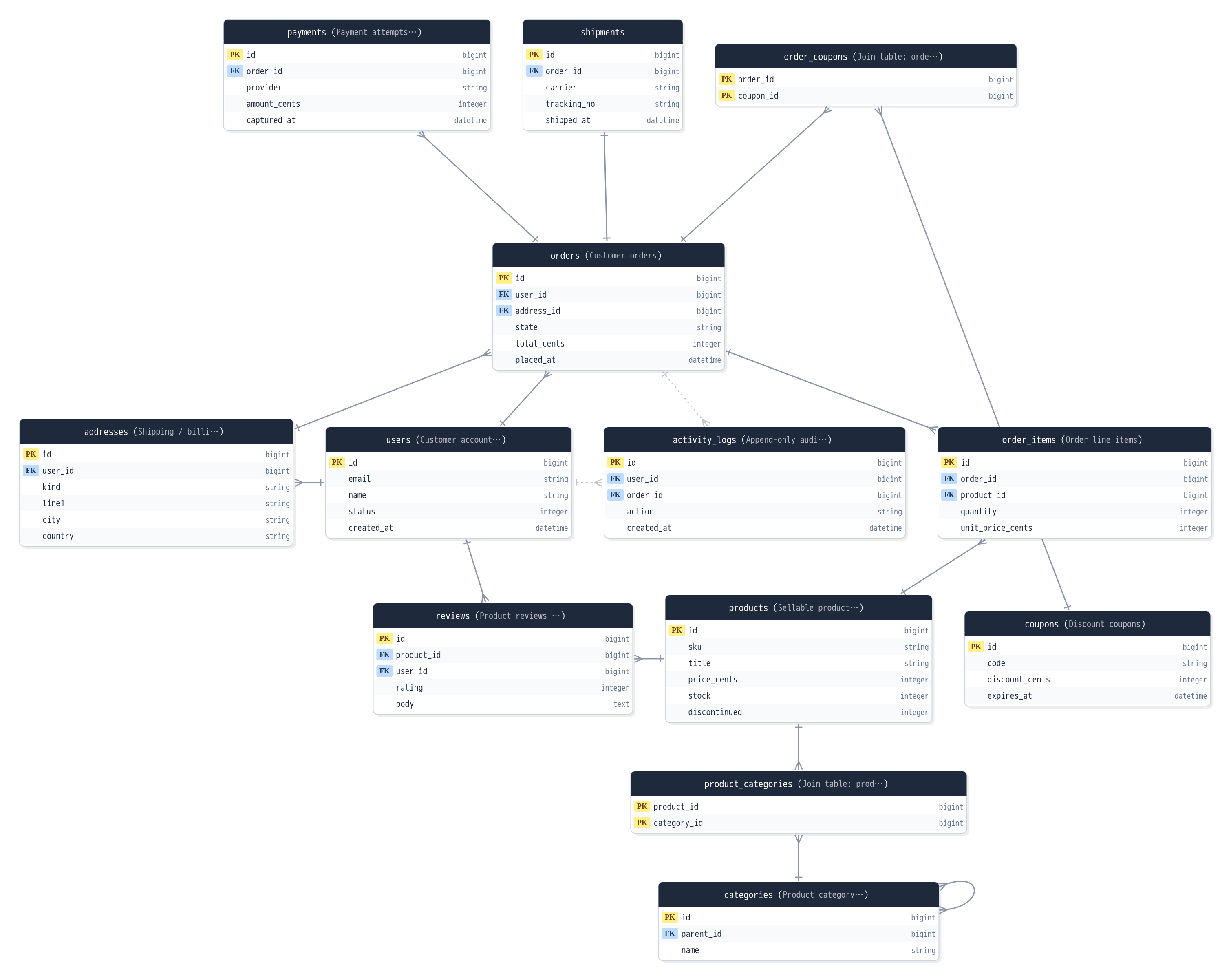
The generated viewer (click for the live demo). Click a table for column details; double-click to focus on its neighborhood.
What to look at
- The table list on the left picks what is shown. Check a starting table and let auto-expand pull in its neighbors.
- Edge styles tell you where each relationship came from — real database FKs, code-declared associations, and name-based guesses are drawn differently.
- Too many tables? Narrow at generation time:
--only 'order*' --exclude 'tmp_*'
- Ship an Excel table-definition workbook next to the diagram:
--excel definitions.xlsx - Capture what you learn as design notes in the config file and show them in the diagram
- Feed this schema to an AI → Recipe 3
Recipe 2 — An ER diagram from code, no database needed #
erdscope statically parses application code (it never executes it). Point it at a Rails / Django / Prisma / SQLAlchemy / Laravel project and it auto-detects the framework, then reads models and associations.
# Just pass the project path (Rails / Django / Prisma / SQLAlchemy / Laravel auto-detected)
erdscope --models path/to/your-app -o schema.html
A code-only diagram is the logical model — the associations your application declares
(belongs_to, ForeignKey, Prisma's @relation, Eloquent's hasMany) become the edges.
Useful for spotting missing migrations, or associations that exist in code with no FK in the database.
What to look at
- Columns appear even without a database (from field definitions in Django / Prisma / SQLAlchemy; Rails gets full columns when
db/schema.rbis present; Laravel is association-only — pair it with the database). - Association names (
has_many :items, through:…) label the edges.
- Reconciling database and code is erdscope's home ground:
erdscope "mysql://…" --models path/to/app -o schema.html— physical (DB) and logical (code) merged into one diagram, with badges marking where each fact came from. - DBML from dbdiagram.io and Mermaid sketches also work as inputs (start design-first from a draft).
Recipe 3 — Feed your schema to an AI #
--emit-digest condenses the whole schema into token-efficient Markdown:
columns, types, PKs/FKs, and associations — plus the design notes from your config file,
the intent no machine could ever infer.
# Condense the schema into a Markdown digest (use - for stdout)
erdscope "mysql://readonly_user:PASS@localhost/myapp" --emit-digest schema.md
The output looks like this (from the bundled sample database):
# demo_shop — schema digest

## Tables (13)

### addresses
- id: integer, pk
- user_id: integer, fk→users
- kind: string
- line1: string
- city: string
- country: string
Rel: belongs_to users as user fk=user_id

### categories
- id: integer, pk
- parent_id: integer, fk→categories
- name: string
Rel: belongs_to categories as parent fk=parent_id
…
Ways to use it
- Paste into a chat: drop schema.md in and ask "design an order-cancellation API against this structure".
- Keep it next to your coding agent: commit
schema.mdto the repository and reference it from CLAUDE.md or your project README. Regenerate whenever the schema changes. - Ask for a design review: "point out normalization problems, naming inconsistencies, and missing indexes".
- Take a snapshot (
--emit-json schema.json) and run--diff schema.jsonin CI — a drift gate that fails when the database strays from the baseline → Recipe 4 - Generate a digest before and after a migration and ask the AI what the change impacts.
Recipe 4 — Wire it into CI/CD: auto-refreshed docs and a drift gate #
Auto-refresh your schema docs
erdscope is built for CI — the output is one self-contained file, so you can drop it
straight onto GitHub Pages or an internal portal. The --emit-digest Markdown works as a
build-time component too: generate it during the build and embed it as the "data model" chapter
of your product manual.
# Generate the HTML and the Markdown digest as build artifacts
erdscope "$DB_URL" -o site/schema.html --no-open --emit-digest site/schema.md
The drift gate
Commit a baseline snapshot to the repository and compare the live database against it in CI. Exit codes: 0 = identical / 1 = differences / 2 = error — a drift fails the job on its own.
# Create the baseline and commit it (update it when a schema change is intended)
erdscope "$DB_URL" --emit-json schema.lock.json --no-open

# In CI: exit 1 when the database strays from the baseline (differences are human-readable)
erdscope "$DB_URL" --diff schema.lock.json
A minimal GitHub Actions template:
name: schema-docs
on:
  push: { branches: [main] }
  schedule:
    - cron: '0 6 * * 1'   # weekly freshness check
jobs:
  schema:
    runs-on: ubuntu-latest
    steps:
      - uses: actions/checkout@v4
      - run: pip install erdscope pymysql
      - name: Generate schema docs (HTML + digest)
        run: erdscope "$DB_URL" -o site/schema.html --no-open --emit-digest site/schema.md
        env:
          DB_URL: ${{ secrets.READONLY_DB_URL }}
      - name: Schema drift gate
        run: erdscope "$DB_URL" --diff schema.lock.json
        env:
          DB_URL: ${{ secrets.READONLY_DB_URL }}
# add a step here publishing site/ to Pages / as an artifactDetails that matter
- Want the report without failing the job?
--diff-exit-zero. Machine-processing the result?--diff-format json. - Update
schema.lock.jsonin the same PR as the migration — then the only thing that can move the baseline is a reviewed, intended change.
- Attach
schema.htmlto every PR as an artifact — an up-to-date diagram during review, always. - Commit the digest (
schema.md) and make it your coding agent's standing knowledge → Recipe 3
If you get stuck #
- The browser doesn't open (server / WSL / over SSH) — generation itself succeeded.
Add
--no-open, then copy the generated HTML file to your machine and open it. It is fully self-contained, so copying the one file is enough. - Can't connect to MySQL / PostgreSQL — check the driver (
pip install pymysql/pip install psycopg). Without one, erdscope falls back to themysql/psqlCLI — details. - Multibyte comments look garbled — see the manual's troubleshooting chapter.
- Too many tables, the diagram is heavy — see working with large schemas
(
--only/--exclude).
Everything else: the manual's troubleshooting / FAQ. Still stuck? Tell us on GitHub Issues.